Claude’s cursor blinks. You paste the prompt: “Read AI-AGENT.md, then craft a dark-mode finance app home screen for mobile.” Hit enter. Seconds later? A flawless HTML file renders in your browser—status bar, balance cards, transaction list, all in premium indigo tones. No fumbling descriptions. No Figma detours.
And just like that, prototyping flips from drudgery to delight. Zoom out: this is DesignKit, a beast of 502 self-contained HTML components plus 33 full-page designs, open-sourced to supercharge AI coding agents. It’s not another UI library—it’s AI’s native tongue for design, built on raw HTML that renders instantly and converts anywhere.
Here’s the spark. Prototyping’s always sucked. Option one: babble at an AI about “premium finance dashboard” and pray for consistency. Option two: Figma marathon, frames upon frames, before a single code line. DesignKit nukes both. Drop its folder anywhere, point your agent at AI-AGENT.md, and watch magic.
Every component uses CSS custom properties instead of hardcoded values: –kit-primary: #6366F1; –kit-bg: #FFFFFF; … Override any token → the entire design recolors instantly.
That quote from the repo? Pure gold. Those CSS vars—over 30 of ‘em—mean one tweak flips light to dark, SaaS indigo to e-com orange. Presets for finance (dark premium), health (soft green), social (vibrant pink)? Baked right in. No more generic sludge.
Why Does DesignKit Work So Damn Well with AI?
Think of HTML as AI’s comfort food. LLMs devoured the web’s HTML firehose during training—no custom DSL needed. Agents like Cursor, Copilot, Claude Code? They grok it natively. Feed ‘em a component snippet, say “convert to Tailwind React,” and it’s surgical. Concrete markup beats your fuzzy “make it look premium” every time.
But wait—structure. AI-AGENT.md isn’t fluff. It’s the blueprint: full token list, component catalog (204 mobile, 200 web, 98 common), layout patterns (safe areas, fixed navs), output rules (inline styles, semantic HTML, no JS). Run: “Design a travel app login, blue-teal preset, web dashboard.” Output? Screenshot-ready HTML. Boom.
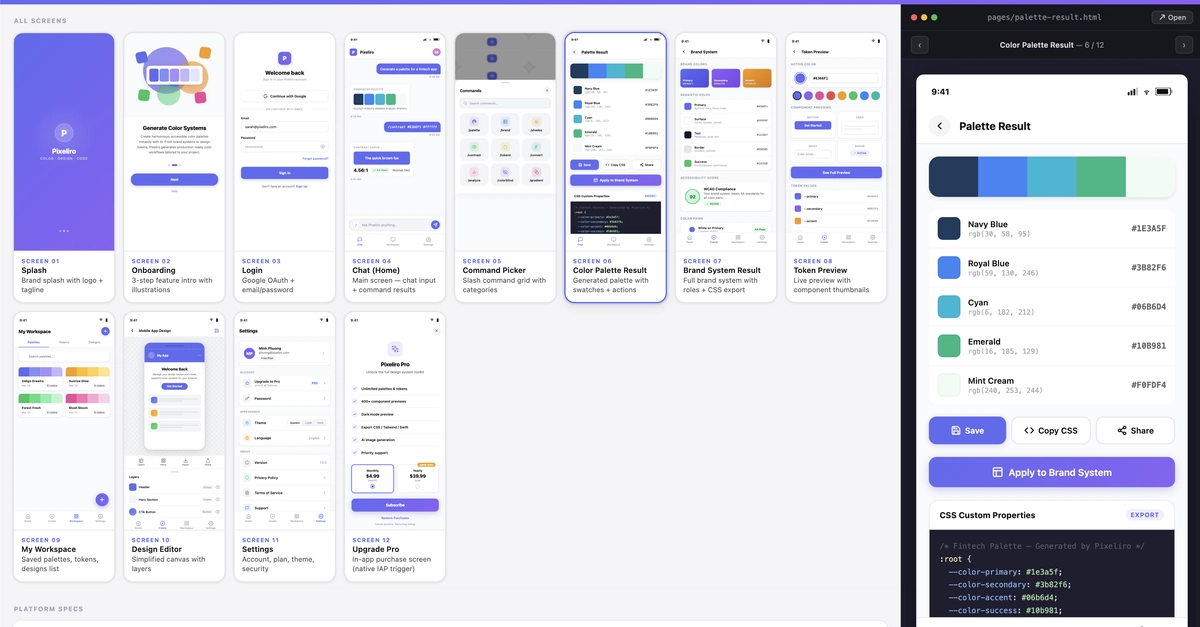
The folder’s a treasure trove. Components split smart: app-mobile for iOS/Android vibes, web for responsive desktops, common for icons and mocks. Then previews and full-designs—17 mobile apps (fitness, food delivery, dating), 16 web (SaaS landings, CRMs, job boards). Each pack? tokenkit.json, CSS vars, index gallery, per-page HTMLs, specs README.
Open a finance dashboard HTML. Swap –kit-primary to your brand hex. Prompt: “Next.js this bad boy.” Afternoon’s design phase? Done. It’s framework-agnostic rocket fuel—React, Vue, Svelte, SwiftUI, Flutter. All from one HTML source.
Why HTML over Figma exports or JSON schemas? It renders. You eyeball the real UI, not abstract data. No tooling tax—designers, devs, agents all sync on one file. That’s the quiet genius.
My hot take—and here’s the insight the repo skips: this echoes Bootstrap’s 2011 explosion, but for the AI-native era. Back then, CSS frameworks democratized web UIs, slashing dev time from weeks to days. DesignKit? It’ll do that for AI-prototyped apps, but faster. Prediction: within a year, indie hackers and startups will churn MVPs at 10x speed, turning prompts into production-ready screens. Corporate PR spins this as “helpful kit,” but nah—it’s a platform shift, handing design superpowers to anyone with an API key.
Skeptical? The live tools seal it. pixeliro.com/design/components browsers every piece. pixeliro.com? AI editor powered by this. Repo at github.com/pixeliro-sys/designkit-source-for-ai—MIT license, contributions begged for (dark presets, framework converters, new designs). Star it, build on it, share your wins.
Can DesignKit Really Replace Figma for AI Devs?
Short answer: For prototyping? Hell yes. Figma’s collaborative polish shines for teams, but solo hustles or agent-first flows? DesignKit laps it. No 30-minute setups. No export hassles. And that token system—change one var, whole kit adapts. Imagine: AI generates your e-com store from a travel preset, you tweak to match branding, convert to SvelteKit. Velocity.
Deeper: it’s the anti-hype. No vaporware promises. Just files that work. Agents don’t hallucinate layouts anymore—they compose from your catalog. Transaction lists stack predictably. Cards shadow consistently. That’s reliability in AI’s wild west.
Wander a bit: I’ve tested similar kits, but they flopped on agent fidelity. JSON schemas? Agents mangle ‘em. Figma SVGs? Messy imports. HTML? Universal. Pair it with a CLI agent, and you’re living the future—prototypes as prompts.
Energy building? Good. Because this isn’t incremental. It’s the kit that makes AI feel like a co-founder, not a toy. Wonder at it: 502 components, 33 designs, all yours to remix.
How Will DesignKit Change AI Prototyping Forever?
Bold call: it’ll birth “prompt-first design systems.” No more siloed designers vs. devs. Everyone speaks HTML. Startups? They’ll A/B entire apps via agent variants. Enterprises? Compliance-safe scaffolding from presets.
One caveat—or excitement: contributions will explode it. Add AR previews? Voice UI components? The MIT floodgates are open.
Thrilling, right?
🧬 Related Insights
- Read more: Cloudflare’s Programmable Flow Protection: Customers Finally Script Their Own DDoS Defenses
- Read more: From Card Swaps to Data Dreams: Skeptical Take on Sports Card Analytics
Frequently Asked Questions
What is DesignKit and how do I use it with AI?
DesignKit’s an open-source repo of 502 HTML components and 33 full-page designs using CSS vars. Point your AI agent (Claude, Cursor) at AI-AGENT.md, prompt a screen, get instant HTML output.
Does DesignKit work with React, Flutter, or other frameworks?
Absolutely—use the generated HTML as a precise reference. Prompt: “Convert this to React with Tailwind” for framework-agnostic magic.
Where can I download DesignKit?
Grab it free at github.com/pixeliro-sys/designkit-source-for-ai. Live demos at pixeliro.com/design/components.