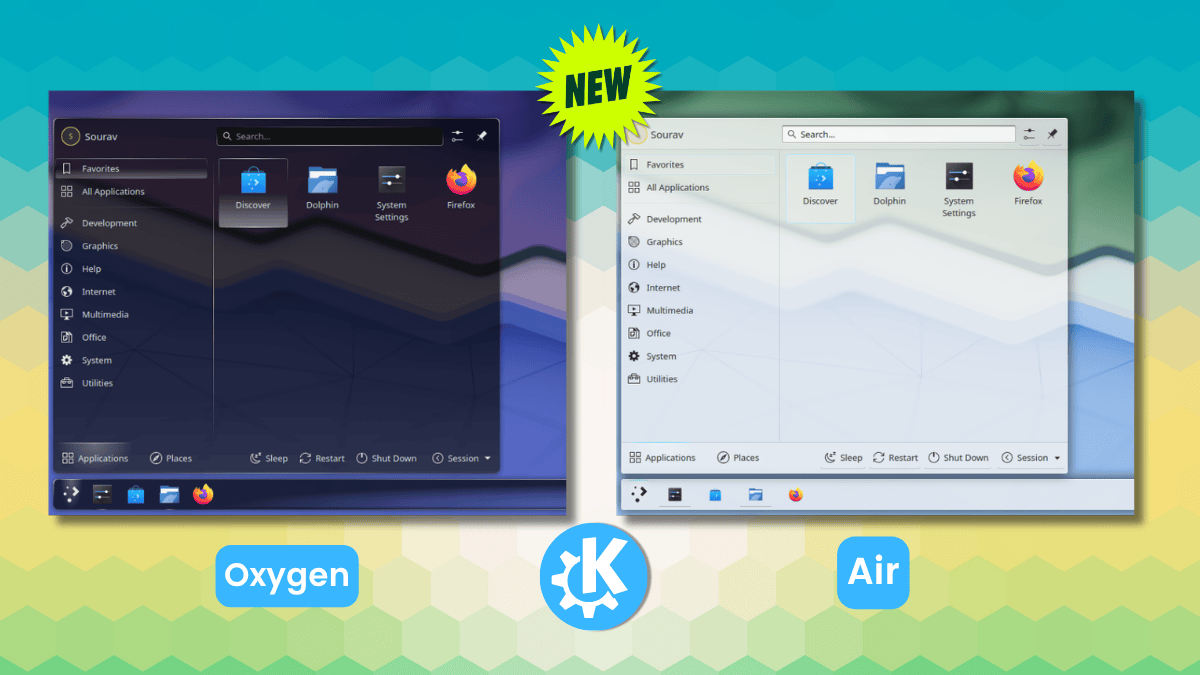
What if your desktop could feel alive again, like peering through frosted windows into a digital dawn?
Glass UI. It’s surging back on Linux, courtesy of KDE Plasma’s bold revival of Oxygen and Air—themes that once defined an era of glassy elegance. And here’s the kicker: ahead of Plasma 6.7’s June 2026 drop, a crew of contributors isn’t just patching these relics; they’re reimagining them for modern hardware, blending nostalgia with cutting-edge blur and adaptive opacity.
Picture this. Back in KDE 4 days—roughly 2008—Oxygen burst onto screens with its dark, gradient-soaked vibe, like a midnight cityscape reflected in rain-slicked glass. Air followed, lighter, transparent, almost ethereal, as if widgets floated on whispers of white. These weren’t flat posters; they were portals, depth pulling you in. Fast-forward through Plasma 5’s grind, where Oxygen limped along broken, Air vanished entirely. Now? Filip Fila, Nuno Pinheiro (Oxygen’s original architect), and KDE devs are on a mission. Panels reworked for any orientation. Missing switches, indicators—poof, added. Air’s transparency reborn with blur backdrops that make text pop without squinting.
“Both themes trace their roots back to the KDE 4 era. Oxygen shipped as the default theme from KDE 4.0, defined by its dark tones and glassy aesthetic.”
That’s straight from the source, capturing why this matters. Glass UI wasn’t gimmick; it was intuitive, mimicking real materials to guide the eye. Flat design—Breeze’s domain—promised minimalism but often delivered bland sameness. Oxygen? Dark heft, like Windows 7’s Aero (yeah, I said it— that era’s glow-up hit hard). Air? Airy translucence, panels fading into the background yet demanding attention.
Why Revive Glass UI on Linux Now?
KDE’s 30th anniversary slams into Plasma 6.7 like perfect timing. But dig deeper—this isn’t mere sentiment. Flat UIs reigned because hardware couldn’t handle blur and layers efficiently. Now? GPUs laugh at that. Compositors like KWin chew through effects that once stuttered. It’s a platform shift, my friends. AI’s reshaping everything, but UIs? They’ve been starved for soul. Glassy depth could make AI interfaces—think agentic desktops—feel tangible, less like staring at a spreadsheet.
My unique take: this echoes the iOS skeuomorphism purge. Apple ditched leather textures for flat, then crept back with subtle depth in visionOS. KDE’s leaping ahead, unencumbered by corporate caution. Bold prediction—by 2028, Glass UI variants will dominate not just Linux, but cross-platform via Wayland’s maturity. Flat’s fatigue is real; users crave that tactile illusion again.
Short version? Oxygen and Air fit Plasma like they were born for it. I spun up KDE Neon, swapped Breeze for Oxygen—bam, panels with weight, widgets breathing shadows. Air? Ghostly grace, blur sharpening edges without haze. Icons stayed Breeze (smart choice, no icon bloat), but the style? smoothly. No jank.
Does Glass UI Beat Breeze for Everyday Use?
Breeze is the reliable sedan—clean, no distractions. But Oxygen and Air? Sports cars with flair. Oxygen’s gradients add hierarchy; menus feel layered, not stacked. Air’s transparency lets wallpapers shine through, turning your desktop into a canvas. Readability? Fixed bugs mean System Monitor charts crisp as ever. Pending tweaks—like Oxygen’s gradient banding or Air’s timer SVG—won’t derail the launch. 26/40 checklist items done; GitLab tracker’s buzzing.
Here’s the thing. In a world of AI copilots cluttering screens, depth declutters visually. Glass UI signals importance—translucent notifications fade, critical alerts glow solid. Breeze whispers; these shout with subtlety. And installation? Dead simple. Grab files, System Settings > Appearance > Plasma Style > Install from File. Apply. Done. Telegram group’s your live feed for dev sync.
But wait—skepticism check. Is this PR fluff for KDE’s big birthday? Nah. Contributors poured weekends into SVGs for checkmarks, radios, toolbars. That’s love, not hype. Breeze stays default (wise), but options explode choice. Linux desktops evolve—remember Compiz cube-spins? This is mature magic.
And.
It sparks wonder. Imagine AI-generated themes riffing on Oxygen’s glass, adapting to your mood, workflow. Plasma’s extensibility makes it prime for that shift. We’re not tweaking pixels; we’re rebuilding how humans interface with silicon souls.
One punchy para: Glass UI’s comeback proves Linux leads UI innovation, again.
Deeper dive. Vertical panels? Now orientation-aware, no clipping. Minimized windows get indicators—tiny, but game-changing for multi-monitor warriors. Adaptive opacity defaults on, syncing with Plasma’s blur engine. Color schemes? No more unreadable widgets. Air’s header/footer? Fresh SVGs, pure polish.
Compare vibes. Breeze: minimalist monk. Oxygen: noir detective’s office, shadows pooling. Air: sunlit atrium, light bending through panes. I lean Oxygen— that Aero kinship hits nostalgia without cheese. But Air wins on modern OLEDs, contrast popping.
How to Install Oxygen and Air on Plasma Today?
Download from the project links. Plasma-equipped rig needed—Neon, Fedora KDE Spin, whatever. System Settings path as above. Test on a VM if cautious. They’re alpha-ish, but stable enough for daily drivers.
This revival? It’s KDE saying: we remember what made desktops delightful. In AI’s ascent, don’t forget the joy of a UI that wows.
🧬 Related Insights
- Read more: Pine64’s PineTime Pro Surfaces: AMOLED, GPS, and a Custom Chip That Could Rewrite Open Wearables
- Read more: Kubernetes 1.35 Patches CSI Drivers’ Token Leak Nightmare—Opt-In Security Without the Chaos
Frequently Asked Questions
What is Glass UI on Linux? Glass UI refers to transparent, gradient-heavy themes like KDE’s Oxygen and Air, reviving 3D-like depth on modern Plasma desktops.
How do I install Oxygen theme on KDE Plasma? Download the file, go to System Settings > Appearance > Plasma Style > Install from File, select, apply. Works on Plasma 6+.
Will Glass UI replace Breeze in Plasma 6.7? No, Breeze remains default—these are optional historical themes for users craving depth over flat minimalism.
